










TL;DR: While Canva is great for quickly creating daily digital content, But to hire graphic designer is essential for creating foundational, legally trademarkable brand assets.
You started your business to share premium, beautifully curated products with the world. You want every touchpoint of your brand to look as effortless and chic as the items you sell. But when it comes to creating your visual identity, you face a major crossroad. Should you hire graphic designer professionals to build your brand from scratch, or can you manage everything using DIY software?
A professional graphic designer is a trained expert. They use industry-standard software like Adobe Creative Cloud to construct original, scalable visual concepts. On the flip side, Canva is a template-driven, browser-based publishing tool. It helps non-professionals assemble pre-made graphical elements quickly.
The debate essentially comes down to strategy versus assembly. Canva democratizes graphic assembly. Graphic designers engineer visual communication. Understanding when to use each resource requires looking closely at your specific marketing, legal, and operational goals.
Are you ready to figure out exactly which route makes the most sense for your growing business?
What exactly does Canva do best?
Canva recently hit a massive milestone of 260 million active users globally. This impressive market penetration exists because the platform solves a very specific problem. It dramatically lowers the barrier to entry for basic digital content creation.
If you operate in an e-commerce, retail, or digital-first space, you will find Canva highly effective for specific tasks.
- Quick Social Media Execution: You can deploy daily Instagram carousels, Pinterest pins, or quick promotional graphics in minutes.
- Internal Corporate Documents: The software makes formatting pitch decks, internal newsletters, or quarterly reports incredibly simple.
- Rapid Prototyping: You can easily build mood boards or visual outlines to send to your actual design team for final execution.
Think about a boutique launching a weekend sale. Hiring an agency to create a simple “20% Off” Instagram story might take 48 hours and cost $150. Using a pre-approved Canva template takes four minutes. In this specific scenario, Canva wins on both velocity and cost.
However, speed and convenience at the execution level do not solve the foundational needs of a growing brand.
Where does DIY design fall short?
Relying entirely on template-based software introduces severe operational and legal risks for scaling businesses. You need to protect your brand’s unique identity.
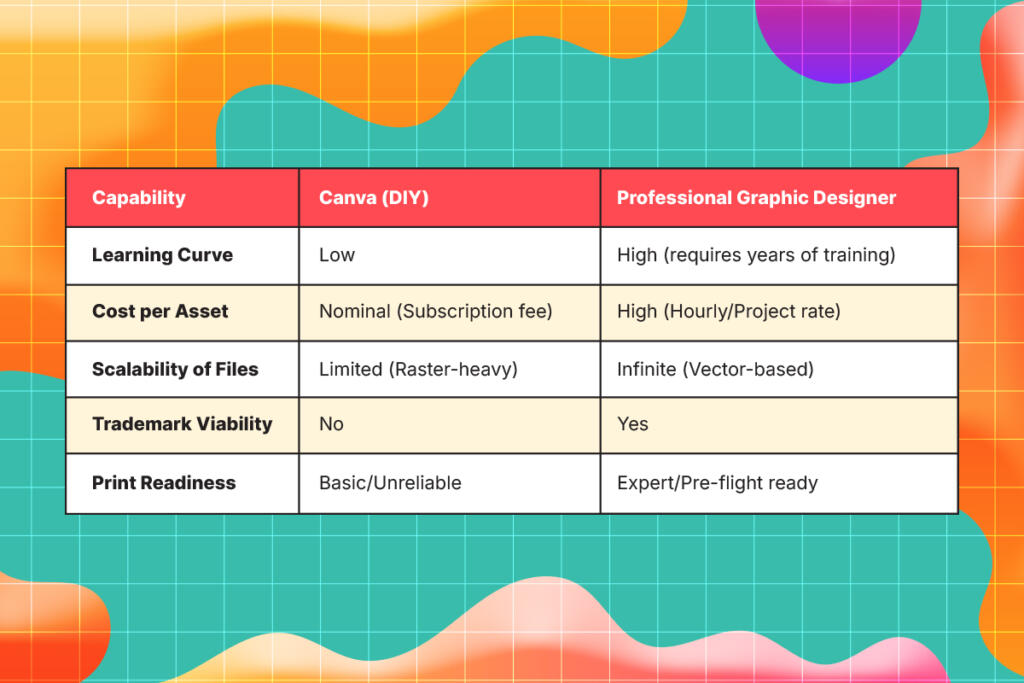
First, you have to watch out for the trademark trap. According to the United States Patent and Trademark Office (USPTO), a trademark must be completely distinct. Canva’s licensing agreement explicitly states that you cannot trademark a logo composed of standard Canva stock elements. These elements are non-exclusive. Millions of other users have access to the exact same graphics.
Legal disputes regarding brand IP cost small businesses an average of $10,000 to $50,000 in early litigation phases. Using a template-based logo exposes you to these steep financial risks if another company claims prior usage of that exact visual layout.
Beyond legalities, you also face a print production nightmare. Commercial printing relies on exact technical specifications. Canva’s automated export settings frequently fail professional pre-flight checks at major print houses. This results in washed-out colors on your premium packaging or misaligned trims on your catalogs.
A professional designer understands how to configure:
- CMYK Color Profiles: Commercial printers use the CMYK color space. Canva defaults to RGB, which is meant for screens. A pro ensures the cyan, magenta, yellow, and black ink levels match your intended design.
- Bleed and Crop Marks: Designers add the standard 0.125-inch overlap so edge-to-edge printing does not leave awkward white borders after trimming.
- Resolution: They guarantee your physical assets are 300 DPI (Dots Per Inch) for crisp, luxurious physical output.
Knowing these limitations makes it clear why leaning on an expert brings undeniable value to your business.
Why should you invest in graphic design services?
Professional design is a direct investment in your company’s visual architecture. When you secure graphic design services, you acquire capabilities that no generic template can offer.
First, professionals create original vector assets. Designers build your core logos, icons, and brand marks using mathematical formulas instead of pixels. These vector files (.AI, .EPS, .SVG) allow you to scale your logo from a tiny woven shoe tag to a massive billboard without any loss in quality.
Second, designers master visual hierarchy and typography. They strategically arrange information to control exactly where your customer’s eye travels. Non-designers often clutter a digital canvas. This confusion directly decreases your conversion rates.
Finally, experts ensure brand consistency. A designer builds a comprehensive Brand Identity Guideline. This master document dictates exact hex codes, typography pairings, and layout rules. It ensures your brand looks identical, premium, and reliable across every single customer touchpoint.
Here is a quick breakdown of how the two approaches compare:
How can you Combine Both for Maximum Efficiency?
You do not have to choose strictly between Adobe Creative Cloud and basic DIY tools. The most efficient marketing teams use a hybrid architecture to keep their visuals stylish and consistent.
Here is a simple step-by-step process for building a hybrid design operation:
- Commission the Core Brand: Hire graphic designer to build your logo, typography system, and brand guidelines.
- Develop Custom Templates: Have that professional create custom, branded templates for your high-volume needs, like social media posts and slide decks.
- Import to SaaS: Upload these original, proprietary vector assets and templates into Canva’s Brand Kit.
- Delegate Execution: Allow your marketing team to use the platform to quickly update text and imagery on these templates for daily output.
This hybrid approach sounds highly efficient, but you still need to calculate what your own time is actually worth.
What is the Real Cost of your Time?
DIY is often labeled as “free,” but it secretly taxes your most valuable asset. Your time as a business owner or marketer is incredibly precious.
Consider this indicative time audit. Let’s say your effective hourly rate as a founder is $150. If you spend 4 hours a week tweaking DIY graphics, the invisible cost of that design work is $600 per week. That translates to an astounding $31,200 annually.
Hiring a traditional agency certainly solves the time drain. Unfortunately, it also introduces high retainer costs and slow turnaround times. You need to explore smart Canva alternatives that offer professional quality without the administrative friction.
Fortunately, there is a modern solution that balances premium quality with predictable pricing.
How does Unlimited Graphic Design Bridge the Gap?
When you outgrow basic templates but lack the budget for a $75,000 per year in-house senior designer, you need a smart middle ground. This is where an unlimited graphic design subscription becomes your best asset.
Platforms like Penji operate on a simple, flat-rate monthly subscription. You receive access to the top 2% of vetted design talent. These professionals are capable of handling everything from custom vector logo creation to complex, print-ready packaging.
- No Hourly Billing: You enjoy a completely predictable monthly overhead.
- Professional Software: All assets are created natively in Adobe Creative Cloud by your team.
- Source Files Ownership: Regarding that, you are the sole owner and original source files (.AI, .PSD) of all assets created.
By leveraging an unlimited graphic design model, you secure the strategic expertise of a seasoned professional. You get this at a price point comparable to fractional hiring, keeping your brand looking effortlessly chic and perfectly curated.
Make the Right Choice for Your Brand’s Visuals
Canva remains a highly effective and reliable tool for quick content assembly. However, it simply cannot substitute the strategic expertise of a seasoned professional.
If your business requires a trademarkable brand identity, scalable vector assets, or technically accurate print files, you need expert help. To maintain your operational speed without paying premium agency prices, integrating an unlimited design service bridges the gap perfectly. Stop wasting hours tweaking templates that dilute your premium brand experience.
Explore an unlimited design service today at Penji, get custom assets executed by top-tier talent, and finally hire graphic designer expertise that scales with your business.
Frequently Asked Questions (FAQs)
No. If you use standard Canva templates or the stock elements, you cannot secure a trademark. The licensing agreement grants non-exclusive rights. yet, a professional designer creates original artwork that you can fully trademark and protect.
A Canva designer generally arranges pre-existing templates and stock assets using a browser-based tool. But a professional graphic designer uses software like Adobe Illustrator to engineer original, scalable visual concepts and layouts completely from scratch.
Canva primarily operates in the RGB color space, which is designed specifically for digital screens. However, Commercial printers require the CMYK color space. Professional designers manually configure CMYK profiles, bleed lines, and crop marks to ensure accurate physical reproduction.
No. While Canva handles basic layouts and social graphics efficiently, it lacks advanced features. It cannot perform the advanced vector drawing, complex masking, typography control, and high-end photo manipulation required for professional-grade design.
It is a subscription model where businesses pay a flat monthly fee to submit unlimited design requests. You get access to a team of professional, vetted graphic designers. It provides agency-quality design output without hourly billing or unpredictable costs.
About the author

Je Ann Bacalso
Je Ann is a creative content writer who crafts engaging, SEO-friendly articles and web copy. With a passion for storytelling and a sharp eye for detail, she delivers clear, compelling content that connects with readers.
Table of Contents
- What exactly does Canva do best?
- Where does DIY design fall short?
- Why should you invest in graphic design services?
- How can you Combine Both for Maximum Efficiency?
- What is the Real Cost of your Time?
- How does Unlimited Graphic Design Bridge the Gap?
- Make the Right Choice for Your Brand’s Visuals
- Frequently Asked Questions (FAQs)






